Watermark System
Welcome to the guide on SpacePixel's custom watermarking system, designed to empower users to protect their astrophotography with ease and confidence. This article explains the system, its features and how to use it effectively.
Written By Dimitar Stoev
Last updated Over 1 year ago
Introduction
The watermarking system on SpacePixel is a critical feature for safeguarding users' intellectual property. By applying customizable watermarks, users can:
Protect their work from unauthorized use.
Maintain the aesthetics of their images.
Build trust in SpacePixel as a secure platform for astrophotography sharing.
Key features
Automatic Application: A watermark is automatically added to every image uploaded after uploading a PNG or JPEG.
Customization: Users can upload, change, or remove their watermark any time.
Selective Application: High-resolution images on the Explore page and user profiles are watermarked, while resized thumbnails are not.
Irremovability: Watermarks applied to images cannot be removed later to ensure consistent protection.
Step-by-Step guide to using the watermark system
Adding a Watermark
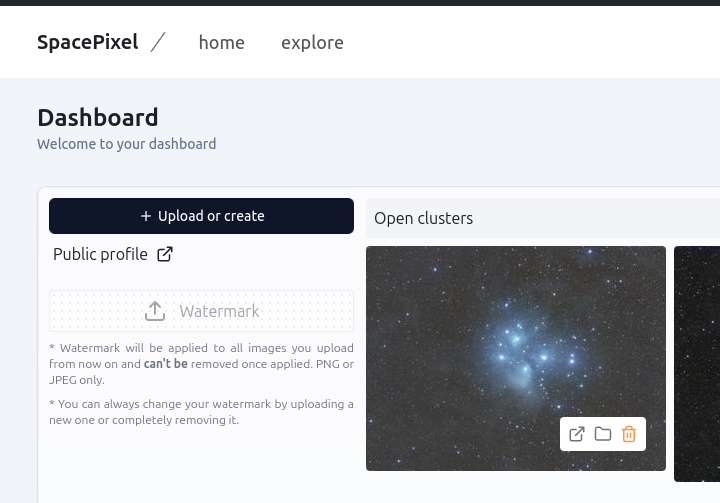
Go to Dashboard.
Click on the Watermark section.
Upload your desired watermark file in PNG or JPEG format.
Review the preview of your watermark on an example image.
Tip: Test the watermark visibility on light and dark backgrounds before finalizing.
Changing your watermark
Return to Dashboard.
Clear the last Watermark.
Upload and preview your changes.
Removing a watermark
Access Dashboard.
Click on the option to remove the current watermark.
Uploading watermarked images
Upload images as you normally would.
Once the upload is complete, the system will automatically apply the saved watermark to the high-resolution version of the image.
Note: Resized thumbnails will remain watermark-free.
Watermark design
Subtle but Visible: Ensure your watermark is noticeable without detracting from the image.
Transparency: Our system overlays the original image with semi-transparent look.
Size and Placement: Watermarks are added to the bottom left with an width of 500 pixels.
FAQs
Can I apply a watermark to images uploaded before this feature?
No, this feature applies only to new uploads.
What happens if I don’t upload a watermark?
Your images will be uploaded without a watermark.
Can I remove the watermark from an image after it’s applied?
No, once a watermark is applied, it is permanent.
Troubleshooting
Issue: Watermark is not displaying correctly.
Verify that your uploaded file is in PNG or JPEG format.
Check for file corruption or unsupported dimensions.
Issue: Watermark doesn’t fit properly on images.
Resize or adjust the dimensions of your watermark file to ensure compatibility with at least of 500 pixels.
Conclusion
The custom watermark system is a powerful tool that enhances security and peace of mind for astrophotographers on SpacePixel. By giving users control over watermark design and application, the platform fosters a safer and more trustworthy environment for sharing creative work.
For further assistance, feel free to contact SpacePixel support. Happy astrophotography!
Was this helpful?
Still need help? Share an idea