Your gallery with collections
SpacePixel's Collections feature allows you to organize your astrophotography images into custom folders. Whether you are categorizing nebulae, lunar shots, or deep-sky captures, Collections enable you to structure your gallery for easy access.
Written By Dimitar Stoev
Last updated Over 1 year ago
Creating a Collection
Step-by-Step Guide
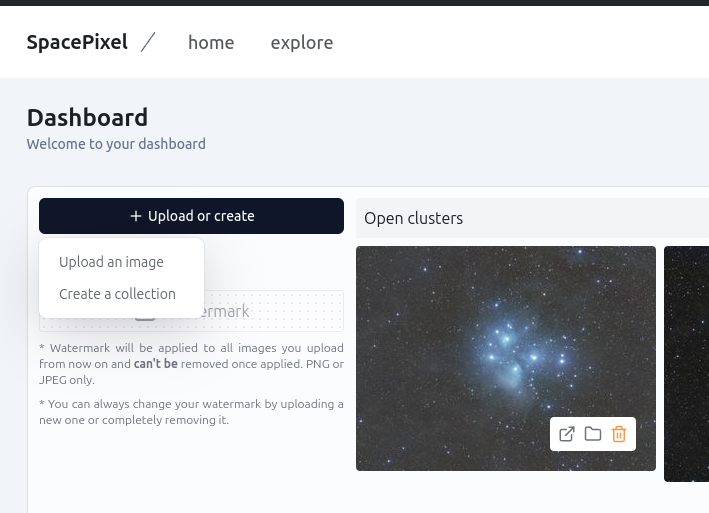
Access the Collections Tab
Log in to your SpacePixel account.
Navigate to your dashboard and click on the "Upload or create" tab in the side menu.
Create a New Collection
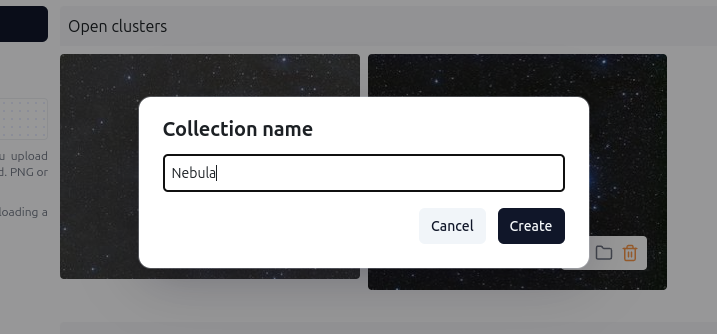
Click on the "Create a collection" button.
Enter a name for your collection. Example: Nebula.
Click Create to save your collection.
Example
Name: Nebula
Adding Images to a Collection
During Upload
Go to the "Upload or create" section in your dashboard.
Click on “Upload an image”.
In the upload interface, choose the target collection from the dropdown menu. If no collection is selected, the images will be placed in the "Unsorted" section.
After Upload
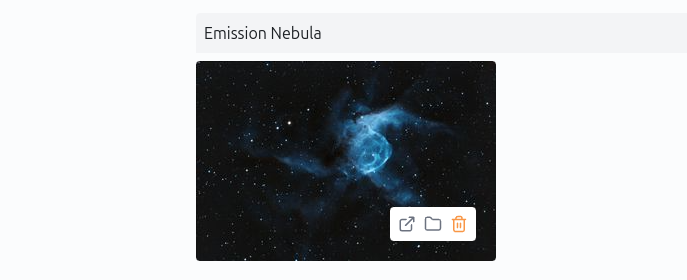
Locate your images in the "Unsorted" gallery.
Click on the folder icon to reassign to a different collection.
Use the "Add to Collection" option to assign it to an existing collection or create a new one.
Save your changes.
Managing Collections
Viewing Collections
Collections are listed on the right side of the Dashboard.
Editing Collections
Delete: Delete a collection by clicking the trash icon. Images within the collection will remain in the gallery but become unsorted.
Add/Remove Images: Images can be reassigned to different collection at any time.
Example Use Cases
Organizing by Theme
Nebulae: Group images of nebulae like the Orion and Horse-head Nebulae.
Planets: A collection dedicated to planetary captures, e.g., Jupiter, Saturn, and Mars.
Project-Based Organization
For astrophotography projects, create a collection for each project to document your process and results.
Start Using Collections Today
The Collections feature is designed to enhance your SpacePixel experience, making it easier to organize and showcase your astrophotography work. Whether you’re an amateur or a professional, this tool helps keep your portfolio visually appealing and well-structured.
Log in now and start creating your Collections!
Was this helpful?
Still need help? Share an idea